Scripts and Variables
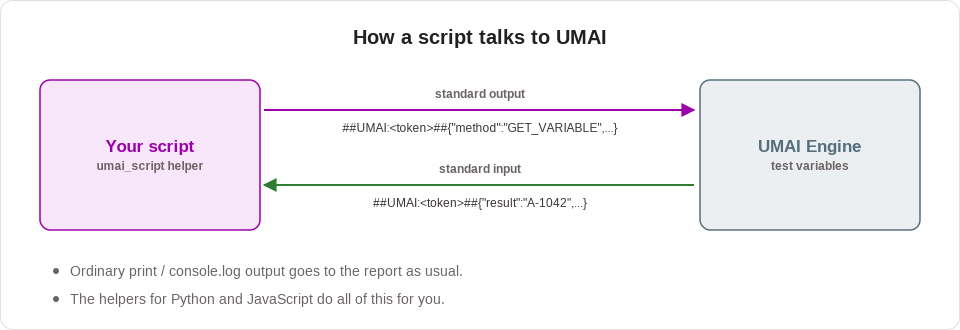
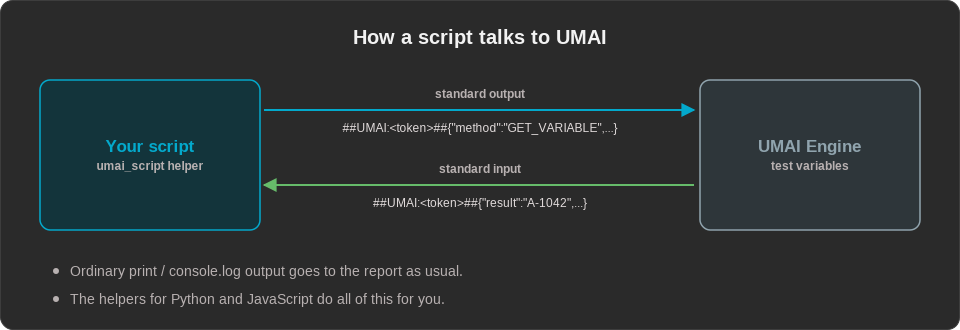
A script in any language can read and write UMAI variables while it's running. It does this by printing a request on a line of its standard output and reading UMAI's answer from its standard input, using a simple line format that any language can write.
For Python and JavaScript there are ready-made umai_script helpers that do all of this for you:
| Language | File |
|---|---|
| Python | umai_script.py |
| JavaScript (Node.js) | umai_script.js |
Each helper is a single file with nothing else to install. Download the one you need, umai_script.py for Python or umai_script.js for JavaScript, and save it next to your script (and commit it, if your script is in a repository). Then import it in your script. For any other language, such as Bash or PowerShell, see Talking to UMAI from any language.
Add the variable to the test first
A script can only write to a variable that already exists. Add it to the test before the script writes to it.
Reading and writing variables
Python:
from umai_script import UmaiScript

umai = UmaiScript()

order_id = umai.get_variable("order_id", source="test")
print(f"Shipping order {order_id}")

umai.set_variable("shipping_status", f"{order_id}-shipped", source="test")
JavaScript:
const { UmaiScript } = require("./umai_script");

async function main() {
  const umai = new UmaiScript();

  const orderId = await umai.getVariable("order_id", "test");
  console.log(`Shipping order ${orderId}`);

  await umai.setVariable("shipping_status", `${orderId}-shipped`, "test");
}

main();
A few rules:
- A script can read any variable the test can see.
- A script can write to any variable that already exists. It can't create new variables - add the variable to the test first.
- Writes happen straight away - the next step sees the new value, even if the command is still running.
- A read gets whatever value is there right now. It doesn't wait for another command to write it first.
- Values maintain data types from entry.
- Use
print/console.logas normal - it goes to the command's output, same as always.
Naming the source
The source tells UMAI which variable you mean: test, environment, global or dataset. Without it, UMAI checks each source and uses the first variable it finds with that name.
Always set the source if the same variable name is used in more than one place - otherwise you might read or write the wrong one.
Available functions
| Python | JavaScript | What it does |
|---|---|---|
get_variable(name, source=None, timeout=None) |
getVariable(name, source, timeout) |
Read a variable |
set_variable(name, value, source=None, timeout=None) |
setVariable(name, value, source, timeout) |
Write a variable |
is_available() |
isAvailable() |
True if UMAI started this script - useful if the same script also gets run by hand |
get_variable and set_variable are methods of UmaiScript. is_available is imported from the helper on its own, e.g. from umai_script import is_available or const { isAvailable } = require("./umai_script").
In JavaScript every call returns a promise, so use await.
Each call waits up to 30 seconds for UMAI to answer. To change this for every call, pass a timeout when you create the helper (UmaiScript(timeout=60) in Python, new UmaiScript({ timeout: 60 }) in JavaScript), or pass timeout to a single call.
Handling errors
If UMAI can't do what you asked - e.g. there's no variable with that name - the call raises an error and your script carries on running, so you can decide what to do.
| Error | When |
|---|---|
UmaiScriptProtocolError |
UMAI refused the request. Check its code: -32001 means the variable couldn't be found. |
TimeoutError (Python) |
UMAI didn't answer in time. |
ConnectionError (Python) |
UMAI stopped listening, e.g. because the command is being stopped. |
In JavaScript, a refused request rejects with a UmaiScriptProtocolError, and the other two reject with an Error.
from umai_script import UmaiScript, UmaiScriptProtocolError

umai = UmaiScript()
try:
    users = int(umai.get_variable("user_count", source="test"))
except UmaiScriptProtocolError as error:
    print(f"Couldn't read user_count: {error.message}")
    users = 10
Creating UmaiScript() outside UMAI (e.g. running the script by hand) raises an error straight away. Check is_available() first if you want the script to work both ways.
Talking to UMAI from any language
Any script that can print a line and read a line can talk to UMAI. Python and JavaScript users can skip this - the helpers do it for you.
Is UMAI listening? When UMAI starts your command, it sets the environment variable UMAI_SCRIPT_TOKEN. If it isn't set, nothing is listening - don't send requests, or your script will wait for an answer that never comes.
Sending a request. Print one line to standard output:
##UMAI:<token>##<request>
where <token> is the value of UMAI_SCRIPT_TOKEN and <request> is a JSON-RPC 2.0 request on a single line. Print the whole line in one go, end it with a newline, and flush. UMAI takes these lines out of the command's output, so they don't show up in the report. Requests printed to standard error are ignored.
Reading the answer. UMAI writes its answer to your script's standard input, as a line with the same ##UMAI:<token>## start. Ignore any line that doesn't start that way.
The requests you can send:
| Request | params |
Answer |
|---|---|---|
| Read a variable | {"name": "order_id", "source": "test"} with "method": "GET_VARIABLE" |
result is the variable's value |
| Write a variable | {"name": "shipping_status", "value": "shipped", "source": "test"} with "method": "SET_VARIABLE" |
result is null |
| List what UMAI can do | none, with "method": "rpc.discover" |
result lists every method and its params |
source is optional, as with the helpers (see Naming the source). value can be any JSON value. Every request needs "jsonrpc": "2.0" and an id - a string or number, not null - which UMAI copies into the answer.
A full exchange, with a shortened token:
→ ##UMAI:Zq7t...##{"jsonrpc":"2.0","method":"GET_VARIABLE","params":{"name":"order_id","source":"test"},"id":"1"}
← ##UMAI:Zq7t...##{"jsonrpc":"2.0","id":"1","result":"A-1"}
→ ##UMAI:Zq7t...##{"jsonrpc":"2.0","method":"SET_VARIABLE","params":{"name":"shipping_status","value":"A-1-shipped","source":"test"},"id":"2"}
← ##UMAI:Zq7t...##{"jsonrpc":"2.0","id":"2","result":null}
An answer has either a result or an error. Check for error - a result of null is a real value, not a failure. An error has a code and a message:
| Code | Meaning |
|---|---|
-32001 |
There's no variable with that name (in that source). |
-32002 |
The request or the answer was over 1 MiB. |
-32602 |
The params were wrong, e.g. no name, or SET_VARIABLE with no value. |
-32600, -32700 |
The line wasn't a valid JSON-RPC request. |
-32601 |
UMAI doesn't know that method. |
The simplest way to stay safe is to send one request and read its answer before sending the next. If you do send several at once, answers can come back in any order, so match them up by id. Don't send a JSON array of requests - it's refused.
Bash
This uses jq to build and read the JSON, so it needs to be installed. Run it with a Command of bash ship_order.sh.
#!/usr/bin/env bash
set -euo pipefail

if [ -z "${UMAI_SCRIPT_TOKEN:-}" ]; then
  echo "This script must be run by UMAI" >&2
  exit 1
fi
prefix="##UMAI:${UMAI_SCRIPT_TOKEN}##"

# Sends one JSON-RPC request and prints its result, or fails with UMAI's error.
umai_call() {
  printf '%s%s\n' "$prefix" "$1" >&3
  local line reply
  while IFS= read -r line; do
    if [[ "$line" == "$prefix"* ]]; then
      reply="${line#"$prefix"}"
      if jq -e 'has("error")' <<<"$reply" >/dev/null; then
        jq -r '"UMAI error \(.error.code): \(.error.message)"' <<<"$reply" >&2
        return 1
      fi
      jq -r '.result' <<<"$reply"
      return 0
    fi
  done
  echo "UMAI stopped listening" >&2
  return 1
}
exec 3>&1

order_id=$(umai_call '{"jsonrpc":"2.0","method":"GET_VARIABLE","params":{"name":"order_id","source":"test"},"id":"1"}')
echo "Shipping order $order_id"

request=$(jq -nc --arg value "$order_id-shipped" \
  '{jsonrpc:"2.0",method:"SET_VARIABLE",params:{name:"shipping_status",value:$value,source:"test"},id:"2"}')
umai_call "$request" >/dev/null
The request is printed to file descriptor 3, a copy of standard output, so it still reaches UMAI when umai_call runs inside $( ). Building the request with jq --arg means quotes and other special characters in the value are escaped for you.
PowerShell
Run it with a Command of pwsh -NoProfile -File ship_order.ps1, or powershell -NoProfile -ExecutionPolicy Bypass -File ship_order.ps1 for Windows PowerShell.
if (-not $env:UMAI_SCRIPT_TOKEN) {
    Write-Error "This script must be run by UMAI"
    exit 1
}
$prefix = "##UMAI:$($env:UMAI_SCRIPT_TOKEN)##"
$script:nextId = 0

# Sends one JSON-RPC request and returns its result, or throws UMAI's error.
function Invoke-Umai([string]$Method, [hashtable]$Params) {
    $script:nextId++
    $request = @{ jsonrpc = "2.0"; method = $Method; params = $Params; id = "$script:nextId" } |
        ConvertTo-Json -Compress -Depth 10
    [Console]::Out.WriteLine($prefix + $request)
    [Console]::Out.Flush()
    while ($null -ne ($line = [Console]::In.ReadLine())) {
        if ($line.StartsWith($prefix)) {
            $reply = $line.Substring($prefix.Length) | ConvertFrom-Json
            if ($reply.PSObject.Properties.Name -contains "error") {
                throw "UMAI error $($reply.error.code): $($reply.error.message)"
            }
            return $reply.result
        }
    }
    throw "UMAI stopped listening"
}

$orderId = Invoke-Umai "GET_VARIABLE" @{ name = "order_id"; source = "test" }
Write-Output "Shipping order $orderId"

Invoke-Umai "SET_VARIABLE" @{ name = "shipping_status"; value = "$orderId-shipped"; source = "test" } | Out-Null
Limits
The helpers keep to these for you in normal use - you'd only hit them with a script that sends a very large number of requests, or with your own code that doesn't follow the rules above:
- No more than 16 requests waiting for an answer at once.
- No more than 64 MiB of requests and answers in one run.
- Your script has to keep reading its standard input while it's waiting for an answer - the helpers do this in the background. If UMAI can't send an answer for 5 seconds, the script is stopped.
Going over one of these stops the script, and the step shows as Stopped before it finished.
A single request or answer can't be over 1 MiB. This one doesn't stop the script: the request gets a -32002 error instead, but so does every other request still waiting for an answer at the time.